How to connect Claude to live stock data, step by step
By Maya Koeva · October 5, 2026 · 7 min read
Ask Claude about a stock and, on its own, it answers from what it learned in training or from a web search. Connect Quantral and it can read current data instead: the stocks investors are talking about most, each company's 0 to 100 signal score, the posts behind that score, monthly recaps, and Quantral's tracked strategies.
Quantral is now listed in Claude's connector directory, so setup takes a couple of minutes and needs no server URL.
What you need
- A Claude account. The steps below use claude.ai or the Claude desktop app.
- A Quantral subscription. The connector reads your Quantral account, so it needs an active plan. The yearly plan starts with a 7-day free trial, and connector access is included in every plan at no extra cost.
- About two minutes.
Step 1: Open Quantral in Claude's connector directory
Go to Quantral in Claude's connector directory and click the add button at the top right of the listing. Signed out of Claude, it reads Sign in to add: sign in to Claude first, and the same button then adds Quantral. You can also get there from inside Claude: open Settings, then Connectors, browse the directory and search for Quantral.
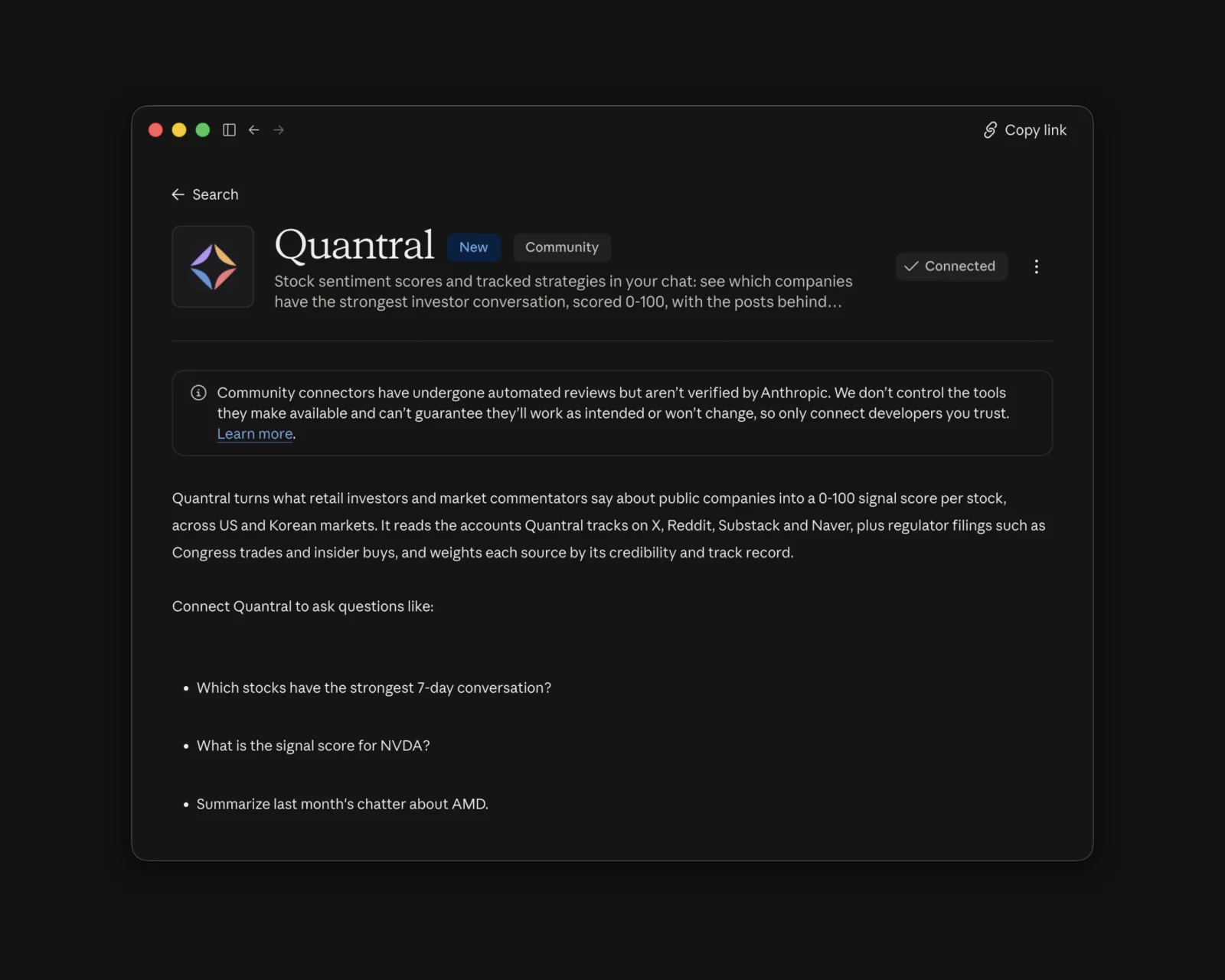
The listing shows what the connector can do and the eight tools it exposes, all read-only. It is marked Community: it passed Anthropic's automated review, and Quantral publishes it.
Step 2: Sign in with your Quantral account
A Quantral sign-in window opens. Use the account that holds your subscription. If you do not have one yet, start the trial at app.quantral.com first, then come back and add the connector again.
You never paste an API key. The connection runs on a standard OAuth sign-in, the same kind you use when an app asks to sign in with Google.
Step 3: Approve access
Quantral then shows a short approval screen: Claude wants access. It lists what Claude gets:
- read-only access to Quantral signals, scores and recaps tied to your subscription
- your name and email address, so it knows whose account it is reading
- nothing else: it cannot change your account, watchlists or billing
Click Accept. The window closes, and the directory listing now shows Quantral as Connected.
Step 4: Ask your first question
Open a new chat and ask something only live data can answer. Claude picks the Quantral tools on its own when a question needs them. If it answers without them, open the tools menu (the + under the message box) and check that Quantral is switched on.
Your first three questions
What is the crowd talking about?
Which stocks have the strongest 7-day conversation?
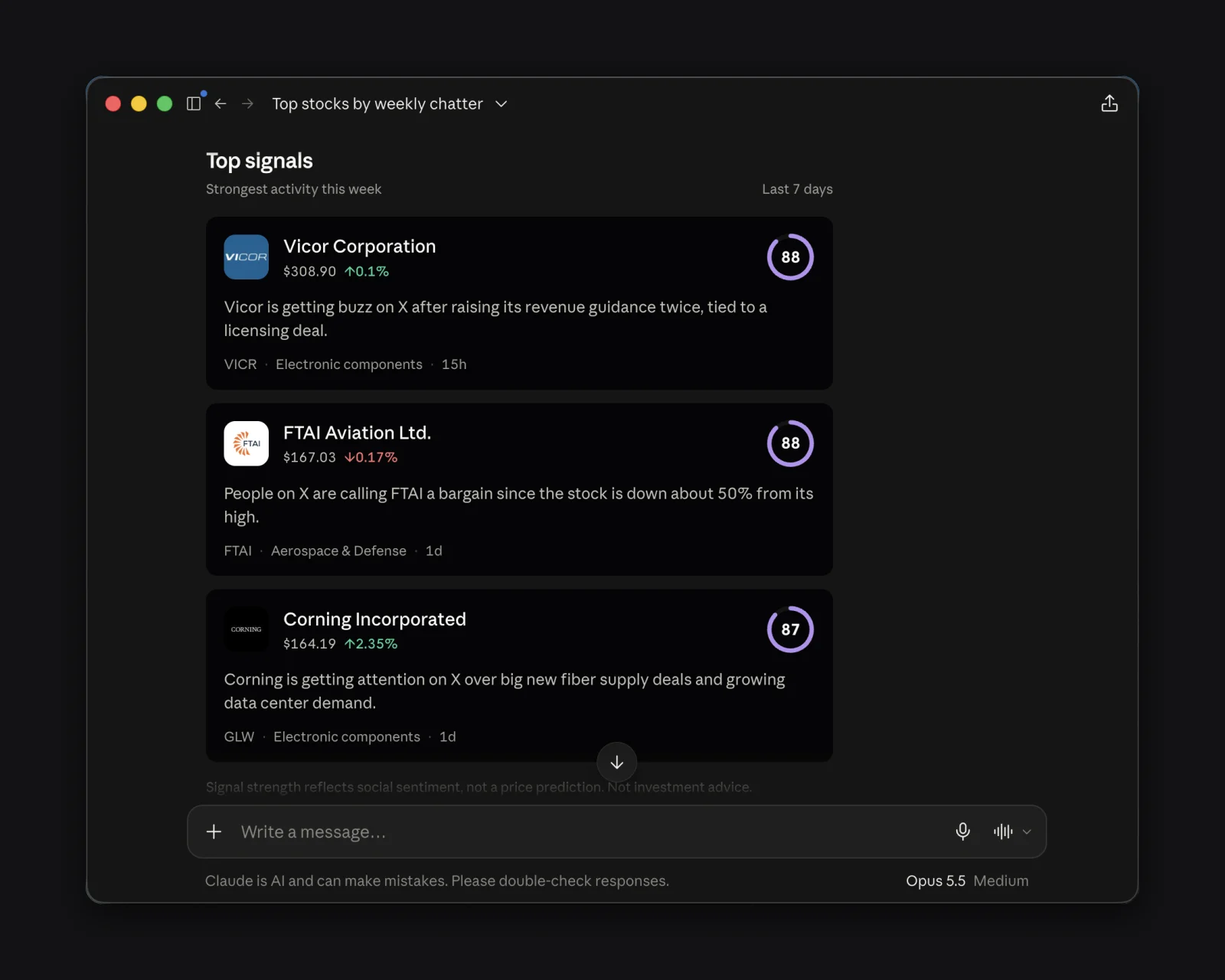
On the morning of October 5, 2026, the answer came back as a ranked card: Vicor at 88, FTAI Aviation at 88, Corning at 87, Meta at 85 and SK Hynix at 85, all in the Strong tier. Each name carries one line on what the conversation is about. Vicor's was a revenue guidance raise, made twice; FTAI's was people calling the stock a bargain after a fall of about 50% from its high.
The card at the top of this page is that answer. It is interactive, and each name links to its page in the Quantral app.
What is one stock's score?
What is the signal score for NVDA?
You get two scores, one for the last 24 hours and one for the last 7 days, each with a tier word: Exceptional, Strong, Moderate, Weak or Negative. Read them together. A strong 7-day score with a weaker 24-hour score is a conversation cooling off; the reverse is one heating up. If a stock comes back with no score, the accounts Quantral tracks did not mention it in that window. That gap describes Quantral's coverage of the name, and says nothing about the market's view.
What changed in a strategy?
What changed in the Capitol strategy this week?
Quantral's strategies are rule-based lists of 10 stocks, rebuilt every week and compared with the S&P 500. Capitol holds the 10 companies members of Congress reported buying the most. Asked on October 5, before that day's update ran, Claude returned the September 28 changes: Bank of Nova Scotia added, Oracle dropped, each with its move since it joined or while it was in the list. Read them as changes to a tracked list; Quantral does not recommend trading them.
From there, keep asking. "Show me the posts behind that score" pulls the individual mentions, each with its author's graded record. "Summarize last month's chatter about AMD" returns the monthly recap. Claude chains these on its own, so one question about a name can lead into a full catch-up. How to research stock sentiment with an AI assistant covers the follow-up questions in depth.
Using ChatGPT or another AI client
The directory listing is Claude's. Every other client connects with the server URL,
https://app.quantral.com/api/mcp:
- ChatGPT: open Settings, then Apps and connectors, then Advanced, and turn on developer mode. Add a connector with the server URL, then sign in and approve.
- Claude, manually: Settings, then Connectors, then Add custom connector, and paste the same URL. You only need this if the directory route is not available to you.
- Any other MCP client: point it at the URL. The sign-in and approval steps are the same.
The /mcp page keeps the current steps for each client.
Connecting a trading agent
The same server works for an AI agent or a bot. It is hosted, so there is nothing to run, it signs in with OAuth instead of an API key, and it accepts 60 requests a minute. An agent can pull the ranked signals on a schedule, check one ticker's score before its own rules act, and read the posts behind it. Sentiment is one input, and you decide how much weight it gets.
If something does not work
- Claude answers without Quantral data. Check the connector is switched on in the chat's tools menu, or ask for it by name: "use Quantral to check NVDA".
- Claude says your subscription could not be verified. The connector needs an active Quantral plan. Check your plan in the app, then ask again.
- The approval window says the request is no longer valid. It expired. Start again from Claude by removing and re-adding the connector.
- You want to disconnect. Remove Quantral under Settings, then Connectors in Claude. Nothing in your Quantral account changes.
Common questions
Is the Quantral connector free?
Every Quantral plan includes it at no extra cost, and it works during the free trial. Without an active plan, the tools do not return data.
Can Claude change anything in my Quantral account?
No. Every tool is read-only. Claude can read signals, scores, recaps and strategies; it cannot touch your account, your watchlists or your billing.
Which stocks does it cover?
US-listed stocks and the Korean exchanges, from the accounts and filings Quantral tracks on X, Reddit, Substack and Naver, plus Congress trades and insider buys.
Is this investment advice?
No. A score measures how strong and how credible the conversation around a stock is, weighted by each author's track record. A score does not predict prices, and a strategy is a tracked list with no buy or sell recommendation. Claude carries the same framing in its answers.
Add Quantral to Claude
Setup takes about two minutes: add Quantral from Claude's connector directory, sign in, approve, and ask which stocks the crowd is talking about this week.
Scores above are a snapshot from the morning of October 5, 2026. Ask Claude for the current reading, or open the Quantral app.
Quantral surfaces signals and context from public sources to support your own research. Nothing here is financial advice or a recommendation to buy or sell. Past signals are not indicative of future results.